
Irfan Shuttari
Director of Product Management, Head of AI Strategy
Move from Case Signals to Source Evidence Faster
In eDiscovery, the entire case can hinge on one early decision: fight or settle. Making that call with confidence requires moving from initial signals to hard evidence faster than ever before.
A topic rises in importance. A communication pattern appears. The tone of a conversation changes. These signals are useful, but they are only the beginning. The critical next step is validating them against the source evidence.
That’s where the latest enhancements to Arctera InsightAI for Early Case Assessment become essential. InsightAI already helps classify data by topic, sentiment, and relevance. Now, these new enhancements make those AI-generated outputs easier to review, search, and validate, shortening the time to insight and connecting every signal to its source.
Why AI-Generated Signals Are Only a Starting Point
AI-generated topics and sentiment can help reviewers orient themselves within a large dataset, but in eDiscovery, orientation is not enough. Reviewers still need to understand what a signal means and whether the underlying communications support further action. This often requires moving between dashboards, searches, and individual emails to reconstruct the story. That movement slows the process and can create uncertainty.
If a topic appears important, reviewers need to know which emails contributed to it. If sentiment shifts, they need to see the communications where that shift occurred. InsightAI now creates a more direct and defensible path from signal to source evidence.
Breaking Open the "Black Box" of AI
A common pitfall of AI in eDiscovery is the "black box" problem—getting an insight without understanding the 'why' behind it. This creates a defensibility risk. The latest InsightAI enhancements are designed to break open that black box, creating a transparent and auditable link between an AI-generated signal and the source evidence a reviewer can validate.
When reviewers examine an email, they can now see both the content and the AI-derived context in the same place, including an AI-generated summary at the top of the preview. If an AI-generated topic is assigned, the reviewer can select that topic and see the supporting sentences highlighted directly in the email body. This provides a practical, human-in-the-loop (HITL) workflow to validate why a topic was assigned and evaluate the source language for themselves.
What’s New in the InsightAI Early Case Assessment Experience?
The latest InsightAI enhancements bring more of the review process into a single, connected workflow.
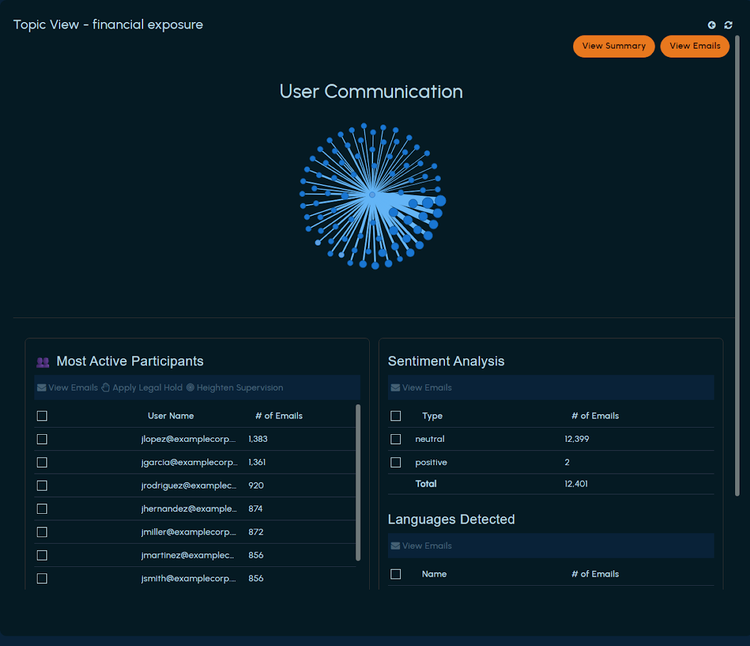
- Expanded Dashboard Interactivity: Reviewers can now use View Emails from multiple dashboard insights, including Topic Cloud, Most Active Participants, Sentiment Analysis, Languages Detected, and Noise Type Breakdown. This allows teams to move directly from a pattern in the dashboard to the emails associated with that pattern.
- Enhanced Search Capabilities: Reviewers can filter case-scoped searches using AI-enriched metadata, including topic, sentiment, language, and noise status. Instead of relying only on repeated keyword searches, teams can refine the dataset using attributes already identified by InsightAI.
- On-Demand Topic Summaries: During topic drill-down, reviewers can select 'View Summary' to open an AI-generated topic-level summary in a side panel. This gives them an initial understanding of the selected topic while keeping the relevant emails available for validation.
How This Accelerates Early Case Assessment
Early case assessment is where teams begin deciding what matters. That work requires understanding whether patterns are meaningful and if the underlying evidence supports further review.
The enhanced InsightAI workflow helps connect those steps. A reviewer can identify a signal, understand the topic, open the relevant emails, and verify the supporting evidence without moving across disconnected workflows. This reduces manual navigation and keeps AI-generated conclusions connected to the source material, creating a defensible audit trail.
When teams can move from an AI-generated topic to the emails and sentences behind it, they can make earlier, more confident decisions about what requires deeper review. They can prioritize issues with stronger context, reduce unnecessary exploration, and refine the direction of the matter with a clearer basis.
The goal is not to remove reviewer judgment, but to empower it. By connecting signals to evidence, InsightAI provides a stronger foundation for making the faster, smarter, and more defensible decisions that lead to better case outcomes.
Explore how Arctera InsightAI connects AI-generated case signals to source evidence within the eDiscovery workflow.
Watch our short video walkthrough to see these new features in action and learn how they can streamline your early case assessment workflow.
Frequently Asked Questions
What AI metadata can reviewers see and search?
Reviewers can view and filter emails using AI-generated topics, sentiment, language, noise status, and noise type.
Can InsightAI show why a topic was assigned to an email?
Yes. Reviewers can select an AI-derived topic and see the supporting sentences highlighted in the email body.
Where can reviewers use View Emails?
View Emails is available from Topic Cloud, Most Active Participants, Sentiment Analysis, Languages Detected, and Noise Type Breakdown insights.
What does View Summary provide?
View Summary displays an AI-generated topic-level summary in a side panel during topic drill-down, allowing reviewers to understand the topic before examining associated emails.